
AutoPoint Photos3.0.8 - App Store
You'll be able to see results in few seconds.
Publisher Description
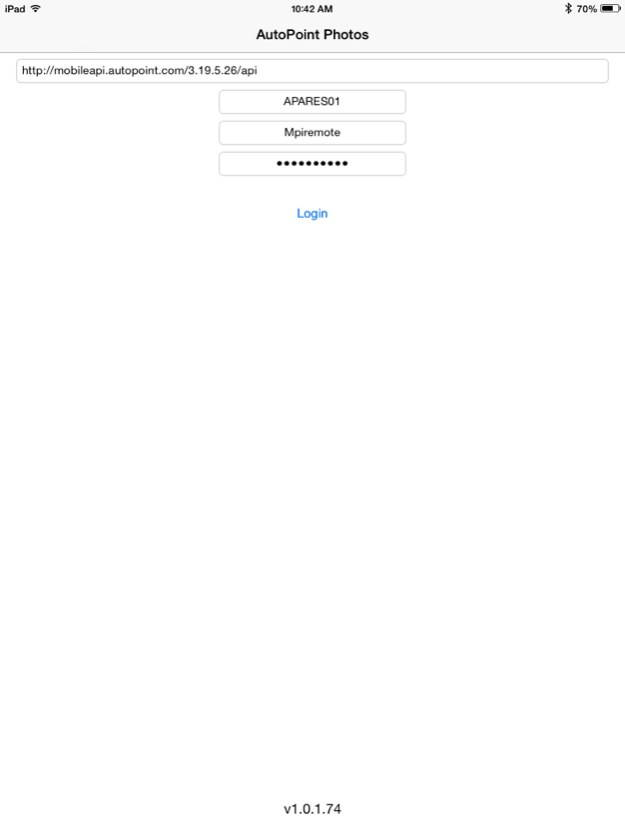


****Important - This app is part of the AutoPoint Platform for automotive dealerships. Do not try to use this app if you do not work at an automotive dealership which utilizes the AutoPoint Platform****
AutoPoint Photos works with your dealership’s MultiPoint software and ties the pictures you take directly to the repair orders of the vehicles you work on. This enables the dealership to quickly and easily share these pictures with the vehicle owner via email or OwnerCare without the cumbersome process of connecting a camera to a computer, saving them to the hard drive, and attaching them to an email.
AutoPoint’s mission statement is to be the demanded partner in vehicle owner care by providing innovative and intuitive technologies and solutions. AutoPoint Photos has been designed with that statement in mind. It allows you to simply input the last 8 digits of the VIN and take a picture. That’s it; no searching for an RO before taking the picture, no uploading the photo to a computer and no attaching pictures to an email. Just type the last 8 of the VIN and take the pictures.
**** Software Features****
- Add captions to draw attention to what the motorist should be looking at in the image
- Works anywhere you have Internet access -- Wifi or cellular
- Access photos taken during prior service visits
- Ability to organize, move and delete photos as needed
- Photos become permanent part of the vehicle record
Bottom line: having pictures of worn or damaged items on the vehicles you service increases customer trust and confidence in the services you recommend because it shows the legitimacy of need services and repairs. This results in happier life-long customers.
Compatibility: Requires iOS 7.0 or later. Compatible with iPhone 4, iPhone 4S, iPhone 5, iPhone 5c, iPhone 5s, iPhone 6 or 6+, iPad 2 Wi-Fi, iPad 2 Wi-Fi + 3G, iPad Wi-Fi (3rd generation), iPad Wi-Fi + Cellular (3rd generation), iPad Wi-Fi (4th generation), iPad Wi-Fi + Cellular (4th generation), iPad mini Wi-Fi, iPad mini Wi-Fi + Cellular, iPad Air, iPad Air Wi-Fi + Cellular, iPad mini with Retina display, iPad mini with Retina display Wi-Fi + Cellular and iPod touch (5th generation).
Jun 9, 2015
Version 3.0.8
This app has been updated by Apple to display the Apple Watch app icon.
- AutoPoint Icons and branding
- 64 bit compatibility
- iOS 8.3 compatibility
- Various crash fixes
- Device side image compression for quicker uploads
- Asynchronous uploads (no need to wait for a photo to upload to keep using app)
About AutoPoint Photos
The company that develops AutoPoint Photos is AutoPoint. The latest version released by its developer is 3.0.8.
To install AutoPoint Photos on your iOS device, just click the green Continue To App button above to start the installation process. The app is listed on our website since 2015-06-09 and was downloaded 0 times. We have already checked if the download link is safe, however for your own protection we recommend that you scan the downloaded app with your antivirus. Your antivirus may detect the AutoPoint Photos as malware if the download link is broken.
How to install AutoPoint Photos on your iOS device:
- Click on the Continue To App button on our website. This will redirect you to the App Store.
- Once the AutoPoint Photos is shown in the iTunes listing of your iOS device, you can start its download and installation. Tap on the GET button to the right of the app to start downloading it.
- If you are not logged-in the iOS appstore app, you'll be prompted for your your Apple ID and/or password.
- After AutoPoint Photos is downloaded, you'll see an INSTALL button to the right. Tap on it to start the actual installation of the iOS app.
- Once installation is finished you can tap on the OPEN button to start it. Its icon will also be added to your device home screen.
Program Details
System requirements
Download information
Pricing
Version History
version 3.0.8
posted on 2020-06-09
9. Juni 2015 Version 3.0.8
- AutoPoint Icons and branding
- 64 bit compatibility
- iOS 8.3 compatibility
- Various crash fixes
- Device side image compression for quicker uploads
- Asynchronous uploads (no need to wait for a photo to upload to keep using app)
version 3.0.8
posted on 2015-06-09
Jun 9, 2015 Version 3.0.8
This app has been updated by Apple to use the latest Apple signing certificate.
- AutoPoint Icons and branding
- 64 bit compatibility
- iOS 8.3 compatibility
- Various crash fixes
- Device side image compression for quicker uploads
- Asynchronous uploads (no need to wait for a photo to upload to keep using app)
version 3.0.8
posted on 2015-06-09
Jun 9, 2015 Version 3.0.8
- AutoPoint Icons and branding
- 64 bit compatibility
- iOS 8.3 compatibility
- Various crash fixes
- Device side image compression for quicker uploads
- Asynchronous uploads (no need to wait for a photo to upload to keep using app)
version 3.0.8
posted on 2015-06-09
Jun 9, 2015 Version 3.0.8
This app has been updated by Apple to display the Apple Watch app icon.
- AutoPoint Icons and branding
- 64 bit compatibility
- iOS 8.3 compatibility
- Various crash fixes
- Device side image compression for quicker uploads
- Asynchronous uploads (no need to wait for a photo to upload to keep using app)
version 3.0.8
posted on 2013-11-07
version 3.0.8
posted on 1970-01-01
9 de jun. de 2015 Version 3.0.8
This app has been updated by Apple to use the latest Apple signing certificate.
- AutoPoint Icons and branding
- 64 bit compatibility
- iOS 8.3 compatibility
- Various crash fixes
- Device side image compression for quicker uploads
- Asynchronous uploads (no need to wait for a photo to upload to keep using app)
Disclaimer
Official App Store Link
We do not host AutoPoint Photos on our servers. We did not scan it for viruses, adware, spyware or other type of malware. This app is hosted by Apple and passed their terms and conditions to be listed there. We recommend caution when installing it.
The App Store link for AutoPoint Photos is provided to you by apps112.com without any warranties, representations or guarantees of any kind, so access it at your own risk.
If you have questions regarding this particular app contact the publisher directly. For questions about the functionalities of apps112.com contact us.
